PST Merge software box image

Screens

Video

Guide

PST Merger Software

Best Tool to Merge and Join Multiple PST Files into One on Mac and Windows OS

  • Option to Merge Selective or Multiple PST Files into One PST File
  • Combine PST Files with Emails, Contacts, Calendars, Tasks, Notes, Journals
  • Merge Multiple PST Files by Excluding Duplicate Emails and Other Attributes
  • PST Merge Software Allows to Merge PST Mailboxes of Different Accounts
  • Having Search File Option to Find PST Files from The Local System
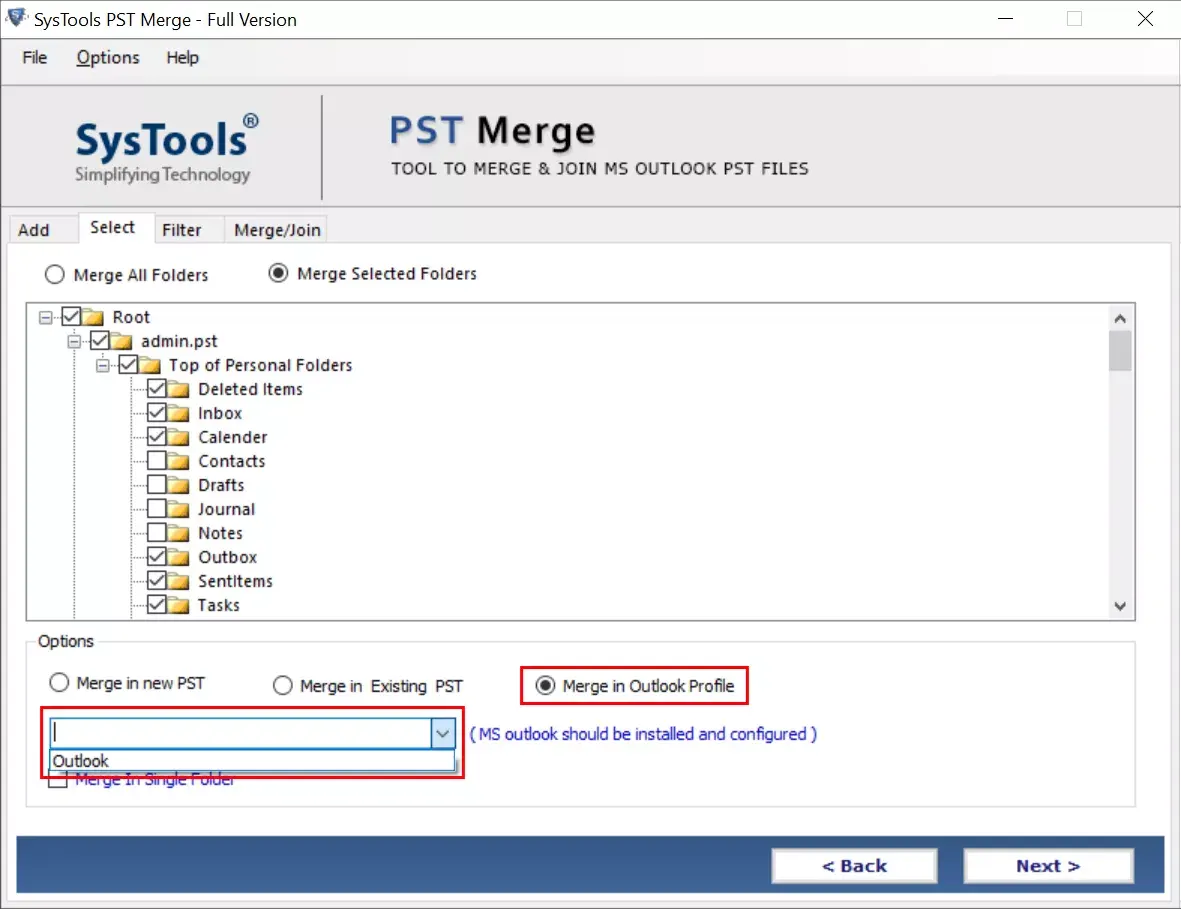
  • Allows to Merge PST Files in New, Exisiting, or in Outlook Profile
  • Option to Include or Exclude Deleted Items while Merging PST Files
  • No 2GB File Size Limitation on Outlook PST File Merging Software
  • PST File Merge Supports Both ANSI & UNICODE Type PST Files
  • PST Merger Software is Available for All Versions of Mac and Windows OS

Download Now
for Windows
Download Now
for Mac OS
Purchase Now
30 Days Money Back*

merge pst files

Merge Different Types of PST Files

Secure Password Protection: This feature allows users to merge password-protected PST files using this tool. User does not have to enter any password for merging protected PST files.

PST File Archive: Users can easily merge archived PST files with the help of this tool without facing any size limitations.

Network PST Files: Merge multiple PST merge files present on the network computer system. You can also merge PST filed into one present on the network directly from the software interface.

microsoft outlook tools

Merge PST Files into Single Folder

Using this amazing feature you will successfully add the PST files that can easily merge or join them in a single folder of the PST file.

PST File Merge Into Single Folder: It allows you to merge bulk files from PST to single folder.

Join PST in a Single Folder: Users can easily join the numerous PST data files into a single one.

Steps to Merge PST Files with All Data

  • Step-1: Download PST File Merge Tool and Launch
  • Step-2: Browse All PST Files That You Want to Merge
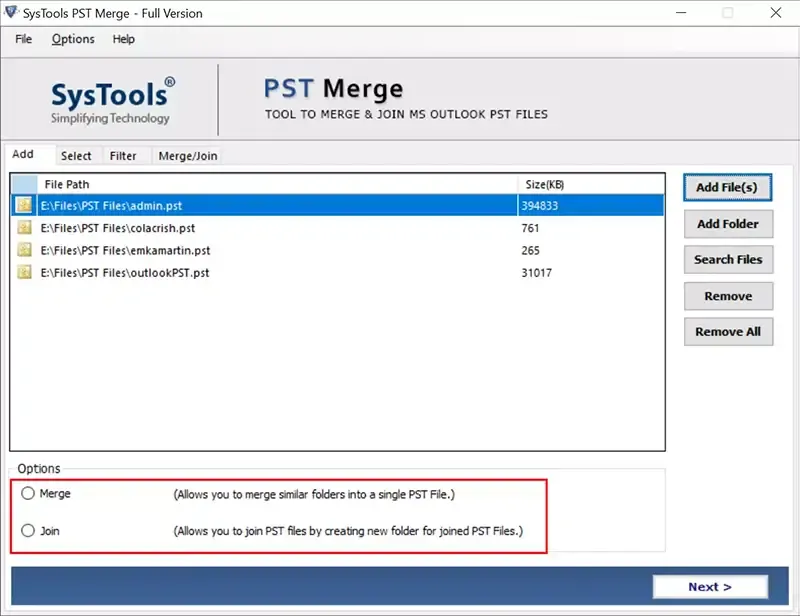
  • Step-3: Choose Either Merge or Join from Software UI
  • Step-4: Select Merge Options to Start Merge PST Proces

Our Awards

microsft outlook tools
merger software
merging tool
best software
microsoft
verified tool

PST Merge Software - Features & Benefits

Combine Multiple PST files in Outlook 2021, 2019, 2016, 2013, 2010, 2007

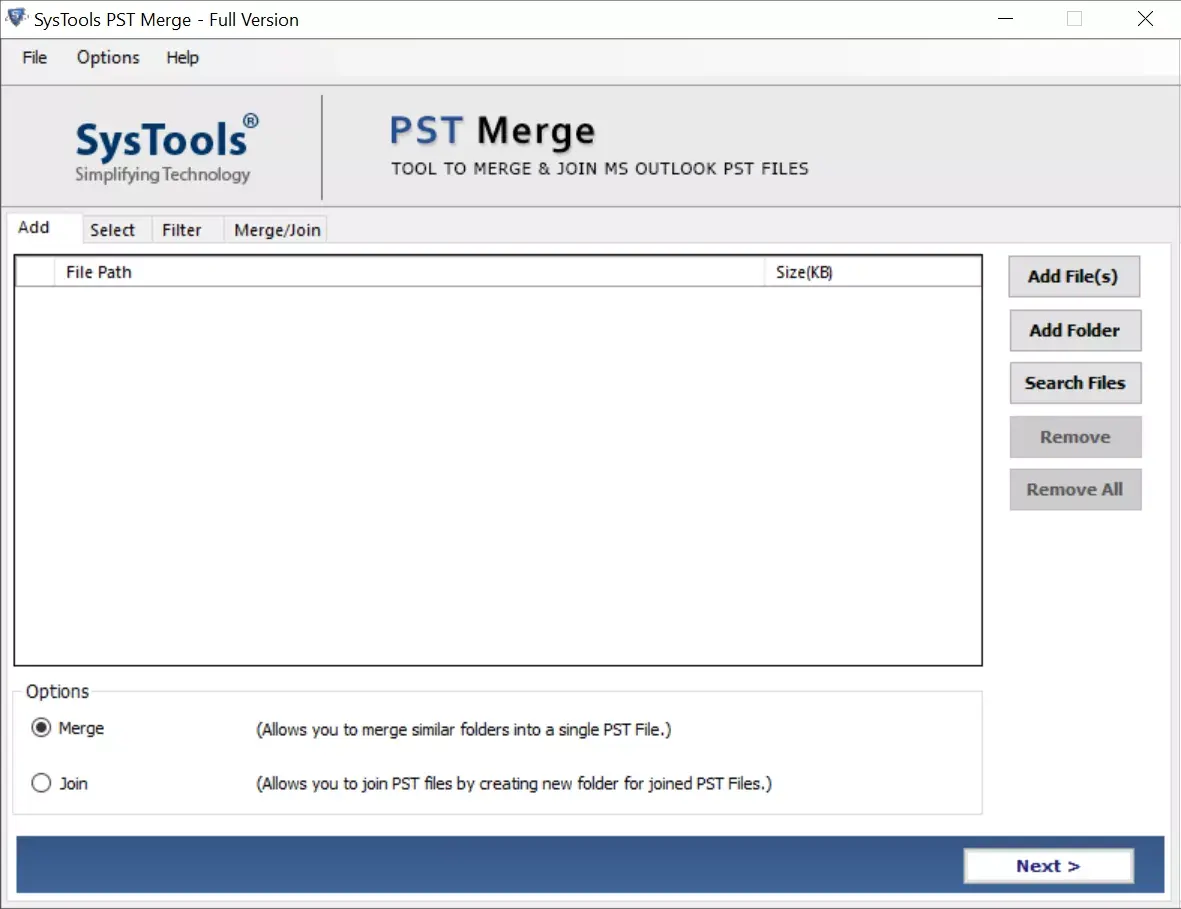
Two Options to Merge PST Files

  • Merge Files: This PST Merge Tool allows users to merge similar folders in resulting PST file.
  • Join Files: Join two or more PST files by creating a new folder in the resultant PST file.

Remove Duplicates & Merge PST

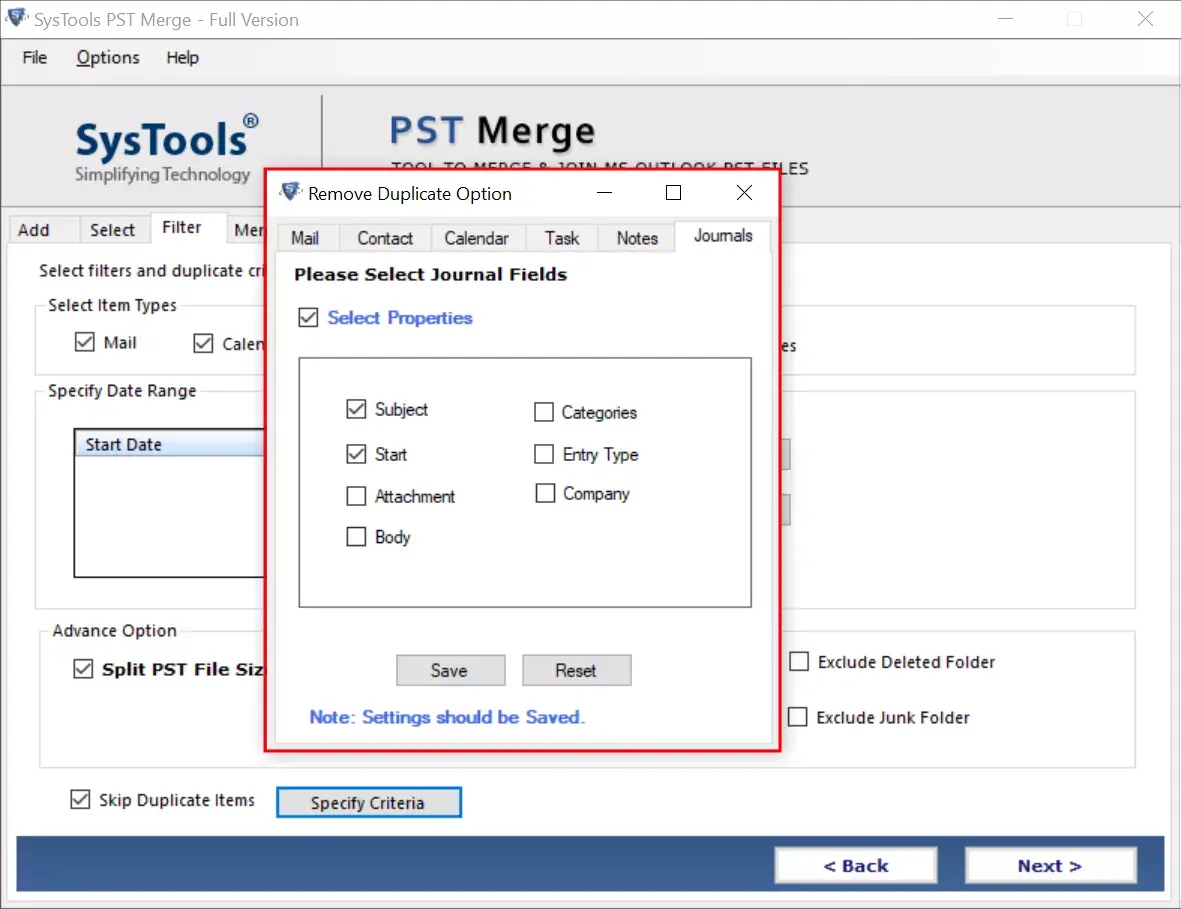
PST merger tool provides various options to merge multiple PST files without duplicating items in resultant PST file. Software is capable to remove duplicate emails, contacts, calendars, notes, tasks and journals and creats a clean PST file.

Browse PST Files in Software

PST merge tool provides "Add File" and "Add Folder" options. User can choose an option as per need. Add Folder will help users to browse all the PST files at once; saved in a folder. On the other hand Add File option allows to browse selected PST files only. We also have a Search File option to make the file selection easier for the users. You need not to browse each file individually to combine them.

Merge PST Files in Different Ways

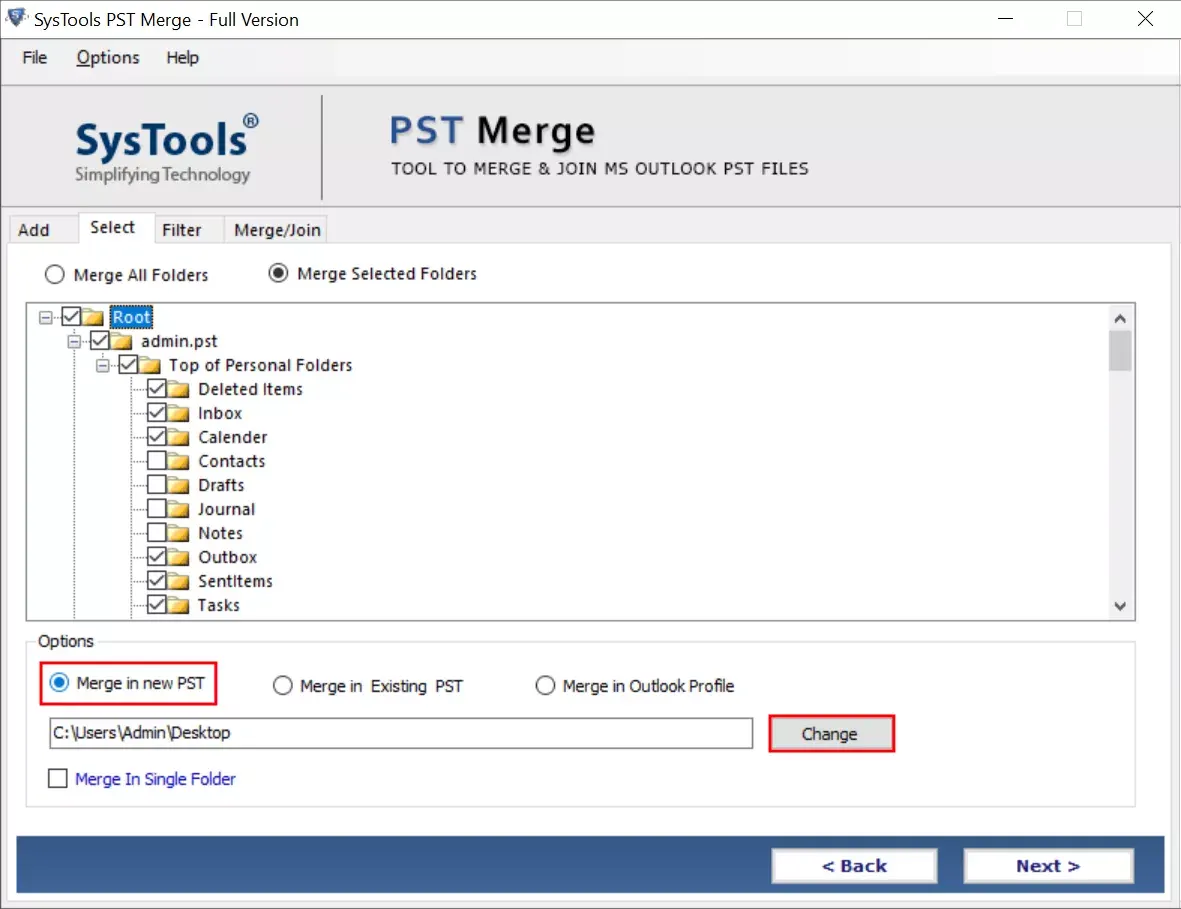
This PST merger software option provides three option to save PST file as per the need of the user. The three option are listed below:

  • Merge in New File
  • Merge in Existing File
  • Merge in Outlook Profile

Merge PST File with All Data Items

Merge two PST files is a suitable option for helping users to combine multiple personal folder data into one account. The excellence of this PST merger is that, it merges entire items like: emails, calendars, contacts, journals, to-do list, tasks, etc. in a seamless manner.

Include and Exclude Deleted Items

PST merger software has an in-built option that allows users to include or exclude Deleted Items folder while merging different Outlook accounts. This has made it easier for a user to keep or remove their trash items of PST files in the newly merged file.

Merge PST File without 2GB Limitation

There is no 2GB file size or other limitations imposed by the PST Merger software while merging PST files. It saves merged data files in Unicode file format whether the format of PST file is ANSI or Unicode.

Support All Versions of Outlook

PST merger tool supports to merge PST files of Outlook 365, 2021, 2019, 2016, 2013, 2010, 2007 and 2003. The tool exports generated PST files in Unicode file format whether you merge ANSI or Unicode PST files.

Merge Password Protected PST Files

While creating archive files as a backup, users sometimes have to combine several PST files because of the insufficient storage space. With the help of this PST combiner tool user can easily merge Outlook archive files and password protected PST files.

Join Selected Folders of PST File

This is best PST merge software to combine specific folders if that is required by the users. Besides this, user can also select the entire folders if there is the need to merge them. Try free demo version to test the software working by merging limited data from all browsed PST files.

PST Merger Software - Specifications

Try Free Demo Version to Test Installation and Merging PST Files

Software Download

Size: 44.56 MB

Version: 7.1

Trial Limitations

Join: Join only first 15 items
Merge: Merge only first 15 items

System Specifications

Hard Disk Space
100 MB of free hard disk space required

RAM
Minimum 4 GB RAM is required

Processor
Intel® Core™ 2 Duo CPU E4600 @ 2.40GHz

Pre-Requisites

  • Microsoft .NET framework 4.5 or above must be installed.
  • MS Outlook should be properly installed and configured while merging data Files into an existing PST or in the Outlook Profile.
  • Please ensure that the added file is neither corrupted nor in use by any other application.

Supported Editions

  • Microsoft Windows – 7 / 8 / 8.1 / 10 (32-Bit & 64-Bit), Windows 11 (64-bit) & Windows Server 2008 / 2012 / 2016 / 2019 / 2021

PST Merge Tool Working Video

Watch the Full Live Video of PST Merger Software

PST Merge Tool - Features Comparison

Understand Software Feature Difference Between Free and Full Version

Features

Free Version

Full Version

Browse Bulk PST File in Software

Search PST Files from System

Merge PST Files without Duplicate Items

Merge Password Protected PST Files

Join Network & Archive PST Files

Exclude Deleted Items & Merge PST Files

Exclude Junk Folders and Merge PST Files

Advanced Filters to Combine PST Files

Merge PST Files with Same Folders

Join Multiple PST Files

Join First 15 Items

All Items

Merge PST Files with All Data

Merge First 15 Items

All Items

Merge PST Files in A Single Folder

Merge First 15 Items

Cost FREE $39

FREQUENTLY ASKED QUESTIONS

Find Your Answer Before Merging PST Files in One PST File

The process of combining two PST files into one PST has become really easier with the best PST Merger software.

  • Download & Install PST merger tool full version
  • Click on Add files, Add Folder or Search Files Option
  • Select Merge or Join Option to Continue Merging Process
  • Choose Merge in New File, Existing File or Outlook Profile
  • Finally, Click on Next to Start PST File Merging Process

This utility can merge any number of files at a time, it completely depends on your convenience. You can combine 2 files as well as multiple files into one instantly.

Yes, PST merger is totally compatible with Microsoft Outlook 2021, 2019, 2013, 2010. Along with this, the software also works on all the earlier versions of Outlook (both 32bit & 64bit).

Yes, if you have checked the "Skip Duplicate Items" dialog box while merging files with the PST merger tool, then it will definitely remove duplicate items from the PST file.

This PST merger software saves the resultant merged file in UNICODE format. This file which can easily be accessed by both; latest as well as previous versions of Outlook (including 2003, 2007, 2010, 2013, 2016, 2019, 2021).

No, if the PST files are corrupted or damaged then, this software does not perform any merging process on them. First, you have to make those damaged PST files, healthy by repairing them.

Yes, With the help of PST merge software, you can easily merge PST inboxes into a single one without any data loss.

Yes, you can easily merge PST files with PST merger software. You just need to download the software and start merging PST files.

Client Reviews

What Users Are Saying?

We are the global leader in End-to-End IT Managed Services, Server Management & Security, and Datacenter Services discipline.

© 2026 MSOutlookTools All Rights Reserved